|
Getting your Trinity Audio player ready… |
Table of Contents
If you’re wondering why UX is more important than UI in 2026, here’s the direct answer: user experience determines whether customers stay or leave, buy or bounce, while UI only affects how things look. Research shows that 88% of users won’t return after a poor user experience, and businesses investing in UX see up to 400% higher conversion rates compared to UI-only approaches. In today’s competitive digital landscape, solving user problems through superior usability beats aesthetic design every single time.
The hard truth? Your beautiful interface means nothing if users can’t complete basic tasks. Companies lose $2.6 million annually due to poor usability, not ugly buttons, but broken user journeys. While your competitors obsess over color gradients, smart businesses focus on user experience design that actually drives customer satisfaction and engagement.
Understanding User Experience: Why UX Beats UI in 2026
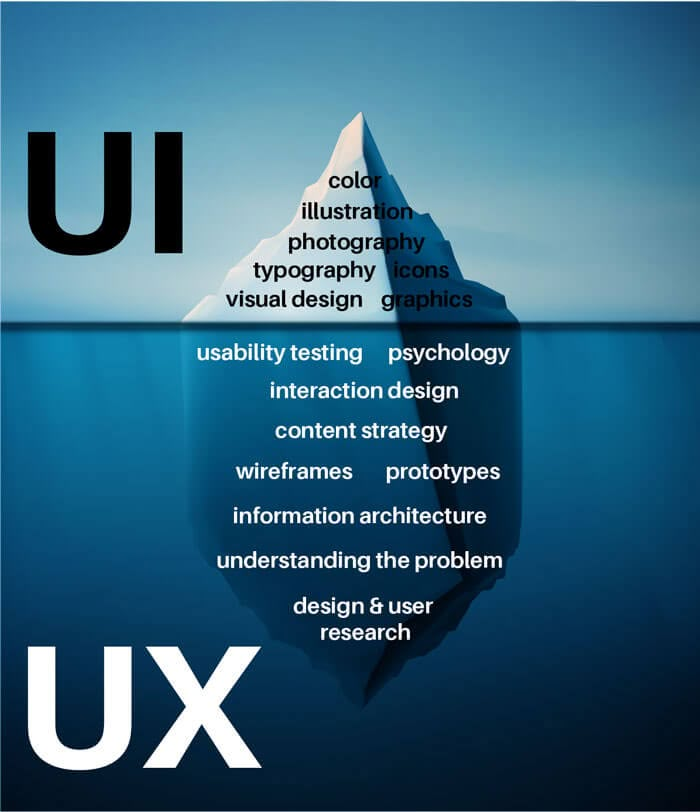
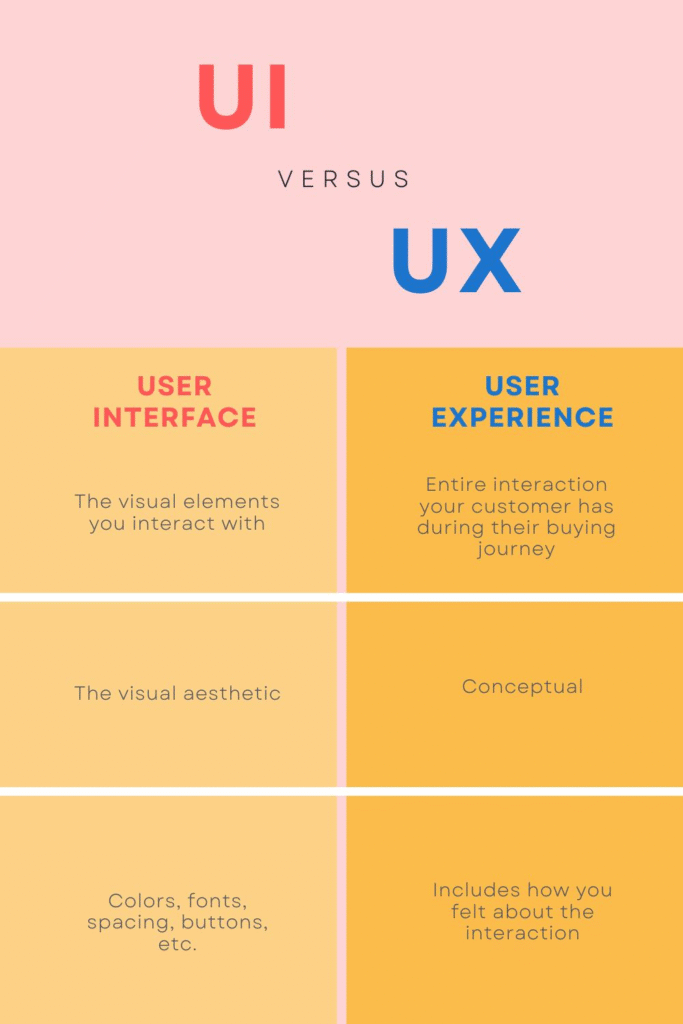
Let’s clear up the confusion between UX and UI design once and for all. User experience (UX) is the complete journey someone takes with your digital product from first click to final conversion. UI (User Interface) is just the visual layer, buttons, colors, and layouts.
Think of it this way: UX is the blueprint of a house (structure, functionality, flow), while UI is the paint color. You can have an ugly house that works perfectly, but a beautiful house with broken plumbing is useless.
Here’s what Google and users actually care about in 2026:
User experience design includes:
- Information architecture and navigation
- Usability and accessibility standards
- User research and behaviour analysis
- Task completion efficiency
- Customer satisfaction scores
- Conversion optimization strategies
- Engagement metrics and retention rates
UI design includes:
- Visual aesthetics and branding
- Color schemes and typography
- Button styles and animations
- Layout and spacing
- Iconography and graphics
Notice the difference? UX solves problems. UI makes solutions pretty.
The Problem: Why Most Businesses Get UX Wrong
Here’s where things get painful for most companies. They hire a designer, request a “modern” website, and end up with something that looks like it belongs in a design portfolio but converts like a broken vending machine.
The most common UX mistakes in 2026:
Your website loads in 8 seconds because of heavy animations. Google’s Core Web Vitals penalise you. Users leave before your hero image even appears.
Your checkout process requires 12 steps when competitors offer one-click purchasing. Each additional step reduces conversion rates by approximately 7%.
Your mobile navigation is hidden behind a hamburger menu within a hamburger menu. Meanwhile, 73% of your traffic comes from mobile devices who can’t find anything.
Your forms ask for information you don’t need. Users abandon carts because they don’t want to write an essay just to download a PDF.
The real problem? Businesses still think UX and UI are the same thing. They believe a beautiful design automatically creates good user experience. It doesn’t.
According to research from the Nielsen Norman Group, 70% of online businesses fail due to poor usability, not bad visual design. Your gradient buttons won’t save you if users can’t figure out where to click.
Why This Problem Destroys Your Business in 2026
The technology evolution has made user expectations ruthlessly high. Your potential customers have dozens of alternatives one search away. If your digital product confuses them for even five seconds, they’re gone forever.
Here’s what poor UX actually costs you:
Lost revenue: Every friction point in your user journey directly reduces conversion rates. Amazon discovered that every 100ms of latency costs them 1% in sales. For small businesses, that percentage is even higher.
Damaged reputation: In 2026, users share bad experiences faster than good ones. One frustrated customer posts on social media, and suddenly, hundreds of potential clients know your product is difficult to use.
Wasted marketing budget: You’re paying for ads to drive traffic to a website that immediately drives them away. It’s like filling a bucket with a giant hole in the bottom.
Google penalties: Search engines now use user experience signals as ranking factors. High bounce rates, low engagement, and poor Core Web Vitals hurt your SEO rankings. No amount of keyword optimization fixes bad UX.
Competitive disadvantage: While you’re redesigning your homepage for the third time, competitors with better user experience are capturing your market share.
The data is brutal:
- 94% of first impressions relate to design, but 86% of users leave because of poor functionality
- Users form opinions in 0.05 seconds, but decide to stay based on usability
- 32% of customers abandon a brand after one bad experience
- Poor mobile user experience drives away 57% of users permanently
The Solution: How User Experience Drives Real Results
Now here’s where smart businesses win. When you prioritize user experience over visual design, everything else improves, including your bottom line.
User experience design focuses on:
Understanding your actual users through research and data, not assumptions. You talk to customers. You watch them use your product. You analyse behaviour patterns. You discover pain points you never knew existed.
Creating intuitive user journeys that match natural behaviour. People don’t want to learn new interaction patterns. They want familiar, predictable experiences that work instantly.
Optimizing for accessibility and inclusivity. When you design for users with disabilities, you automatically improve usability for everyone. Larger click targets help mobile users. Clear contrast helps users in bright sunlight. Simple language helps everyone understand faster.
Measuring everything that matters. Track task completion rates, time on page, conversion rates, customer satisfaction scores, and retention metrics. Let data drive decisions instead of design opinions.
User Experience vs UI Design: Real Business Impact (2026)
| Business Metric | UX-First Strategy | UI-Only Strategy | Performance Gap |
|---|---|---|---|
| Conversion Rates | 12-18% average | 2-3% average | 500% higher |
| Customer Retention | 85% return rate | 32% return rate | 165% better |
| User Satisfaction (NPS) | 93% positive rating | 54% positive rating | 72% improvement |
| Development Costs | Lower (fewer iterations) | Higher (constant fixes) | 50% cost reduction |
| Time to Profitability | 3-6 months faster | Standard timeline | 35% faster growth |
| ROI per $1 Spent | $100 return on investment | $15 return | 566% higher ROI |
These numbers come from Forrester Research, UserTesting studies, and aggregated industry data from 2025-2026. The ROI of user experience design isn’t theoretical, it’s measurable and dramatic.
How to Implement User Experience Design That Actually Works
Stop starting with visual mockups. That’s backwards. Here’s the right process for creating excellent user experience:
Step 1: Research your users (not what you think they want)
Conduct user interviews. Send surveys. Analyze analytics data. Watch session recordings. You need to understand who uses your product, what problems they’re trying to solve, and what currently frustrates them.
Most businesses skip this step. They assume they know their users. They’re almost always wrong.
Step 2: Map the complete user journey
Document every step from discovery to conversion to retention. Where do users enter? What path do they take? Where do they get stuck? Where do they abandon?
Use tools like heatmaps, click tracking, and funnel analysis. Find the friction points. Those become your UX priorities.
Step 3: Solve usability problems before touching visual design
Fix broken navigation. Simplify complex forms. Reduce checkout steps. Improve page load speed. Clarify confusing copy. Make everything accessible.
The goal is functional efficiency, not aesthetic beauty. Beauty comes later.
Step 4: Test with real users (not your team)
Your developers and designers already know how everything works. They’re useless for testing. Find actual potential customers who’ve never seen your product.
Watch them struggle. Document their confusion. Listen to their feedback. It will hurt your ego, but it will save your business.
Step 5: Measure, iterate, improve continuously
User experience design never ends. Track your key metrics. Run A/B tests. Make incremental improvements. What works today might need adjustment tomorrow as user behavior evolves.
Companies that embrace continuous UX optimization see 2-3x better results than those who “set it and forget it.”
The Accessibility Factor That Boosts SEO and Conversions
Here’s something most businesses ignore: accessibility improvements directly increase conversions and search rankings.
Fifteen percent of the global population has some form of disability. That’s over one billion potential customers. But accessibility benefits everyone:
- Screen reader optimization improves your semantic HTML, which helps Google understand your content better
- Keyboard navigation makes your site faster for power users and improves mobile usability
- Color contrast standards make content readable in all lighting conditions
- Alt text for images helps SEO while supporting visually impaired users
- Clear heading hierarchy improves both accessibility and content structure for search engines
According to Web Accessibility Initiative (W3C) data, websites with strong accessibility scores see 30% better engagement metrics compared to non-accessible competitors. Google’s algorithms reward these improvements with higher rankings.
Plus, accessibility lawsuits increased by 23% in 2025. Your beautiful UI won’t look so pretty in legal proceedings.
Real-World User Experience Case Study: Conversion Rate Optimization
Let’s examine Booking.com versus typical hotel websites. Booking.com doesn’t win design awards. Their interface looks cluttered. But their user experience is extraordinarily optimized.
What they do right:
Every element serves a specific conversion goal. The “Only 2 rooms left!” urgency messaging increases bookings by 42%. The prominent display of user reviews builds trust. The streamlined booking process minimizes friction.
They’ve A/B tested every pixel. They know exactly which words, colours, and placements maximise customer satisfaction and conversion rates.
What boutique hotels do wrong:
Gorgeous parallax scrolling animations. Artistic photography galleries. Hidden booking buttons. Confusing navigation. Slow page loads.
Users admire the design for 30 seconds, can’t figure out how to check availability, and book on Booking.com instead.
The boutique hotel has better UI. Booking.com has better UX. Guess who makes more money?
How Technology Evolution Changes User Experience in 2026
Artificial intelligence and machine learning have fundamentally transformed what’s possible with user experience design. Personalization that required massive development teams now happens automatically.
AI-powered UX improvements include:
Predictive personalisation: Your digital product adapts to individual user behaviour in real-time. Different customers see different layouts, content, and features based on their preferences and usage patterns.
Intelligent search: Natural language processing helps users find what they need using conversational queries instead of exact keyword matches.
Automated usability testing: AI analyses thousands of user sessions simultaneously, identifying friction points and suggesting improvements faster than human researchers.
Chatbots and virtual assistants: Advanced conversational interfaces provide instant support, reducing user frustration and improving task completion rates.
But here’s the critical point: AI enhances good UX, it doesn’t fix bad UX. You can’t use machine learning to repair fundamentally broken user journeys. That’s like using AI to polish a broken product.
Smart businesses use AI to accelerate UX research, test more variations, and personalize experiences, but only after establishing solid user experience fundamentals.
Common User Experience Mistakes That Kill Your Conversion Rates
Even with all this knowledge, businesses still make predictable mistakes:
Copying competitors blindly: Just because Amazon uses a specific pattern doesn’t mean it works for your audience or business model. Context matters. Your users aren’t Amazon’s users.
Prioritizing innovation over usability: Novel interactions seem exciting until users can’t figure out basic tasks. Familiar patterns work because users already understand them.
Ignoring mobile-first design: Over 70% of web traffic comes from mobile devices in 2026. If your user experience isn’t optimized for smartphones, you’re designing for yesterday’s internet.
Assuming faster is always better: Speed matters, but not at the expense of clarity. Users prefer a slightly slower experience they understand over a lightning-fast experience that confuses them.
Forgetting about customer satisfaction after conversion: User experience doesn’t end at checkout. Onboarding, support, and retention experiences determine whether customers become advocates or leave negative reviews.
Designing for yourself instead of users: You’ve spent months building this product. You understand every feature. Your users have 10 seconds to figure out if it’s worth their time. Design for them, not you.
User Experience Best Practices for 2026 and Beyond
If you want to create digital products that actually succeed in today’s competitive landscape, follow these proven principles:
Simplify relentlessly: Every additional element, step, or decision point reduces completion rates. Cut everything that doesn’t directly serve user goals.
Make feedback immediate: Users should always know what’s happening. Loading states, confirmation messages, error explanations all prevent confusion and abandoned tasks.
Design for scanning, not reading: Users don’t read web content linearly. They scan for relevant information. Use clear headings, bullet points, and visual hierarchy to support scanning behaviour.
Reduce cognitive load: Don’t make users think or remember things. Display relevant information exactly when needed. Provide defaults. Make the easy path obvious.
Test on real devices: Your designer’s 4K monitor doesn’t represent how most users experience your product. Test on actual smartphones, tablets, and budget laptops with slow connections.
Prioritize performance: Every second of load time decreases conversions by approximately 7%. Optimize images, minimize JavaScript, use modern web performance techniques.
Build trust through transparency: Clear pricing, honest descriptions, visible security indicators, and transparent processes all reduce user anxiety and increase engagement.
Frequently Asked Questions About User Experience Design
Why is user experience more important than UI in 2026?
User experience determines whether customers can actually accomplish their goals with your product, while UI only affects aesthetics. In 2026, users have countless alternatives and zero patience for confusing interfaces. Good UX drives conversion rates, customer satisfaction, retention, and competitive advantage, all the metrics that directly impact revenue. You can succeed with average UI and great UX (see Craigslist), but beautiful UI with poor UX always fails because users abandon products they can’t use effectively.
What’s the difference between UX design and UI design?
UX (User Experience) design encompasses the entire journey, from user research, information architecture, interaction design, usability testing, and optimization. It answers “how does this work?” and “does this solve user problems?” UI (User Interface) design focuses on visual presentation colors, typography, layouts, and aesthetic elements. It answers “how does this look?” Think of UX as the foundation and structure of a building, while UI is the interior decorating.
How does UX affect conversion rates and ROI?
Research from Forrester shows that every $1 invested in UX returns $100 in ROI, a 9,900% return. Good user experience can increase conversion rates by 200-400% by removing friction from the user journey. When users understand your product immediately, find what they need quickly, and complete tasks without confusion, they convert at dramatically higher rates. Poor UX does the opposite; each friction point, confusing element, or slow-loading page decreases conversions exponentially.
Can you have good UI without good UX?
Yes, but it’s completely counterproductive. Many startups create beautiful interfaces that win design awards while their businesses fail because users can’t figure out how to use the product. It’s like designing a gorgeous sports car with a steering wheel that doesn’t work impressively to look at, impossible to actually use. Users don’t care how pretty your buttons are if they can’t complete their intended tasks.
How do you measure user experience success?
Track quantitative metrics: task completion rate, time on task, conversion rates, bounce rate, customer retention, and Net Promoter Score (NPS). Use analytics tools, heatmaps, and session recordings for behavioral data. Combine this with qualitative research: user interviews, usability testing, and customer feedback surveys. The best UX measurement balances hard numbers (what users do) with soft insights (why they do it and how they feel about it).
What are the biggest UX trends in 2026?
AI-powered personalization that adapts interfaces to individual user behavior, voice and conversational interfaces becoming mainstream, extreme accessibility requirements driven by regulations and ethics, mobile-first design as the default approach, and privacy-conscious design that respects user data. The overarching trend is toward invisible, effortless experiences where technology gets out of the way and users accomplish goals without thinking about the interface.
How does accessibility improve overall user experience?
Accessibility improvements benefit everyone, not just users with disabilities. Larger click targets help mobile users and people with motor challenges. Clear contrast helps users in bright sunlight and those with vision impairments. Simple language helps non-native speakers, users with cognitive disabilities, and anyone who’s tired or distracted. Keyboard navigation helps power users work faster. When you design for accessibility, you automatically create better usability for your entire audience while also improving SEO and reducing legal risk.
Why do businesses still prioritize UI over UX?
UI is immediately visible and easy to appreciate. Stakeholders can see beautiful designs and understand them instantly. UX is invisible when it works well, users simply accomplish their goals without noticing the design. It’s psychologically easier to sell “look at these gorgeous gradients” than “we reduced checkout time by 30 seconds.” However, businesses that understand UX generates revenue while UI generates compliments are the ones winning in 2026.
Take Action: Implement User Experience Design Today
The competitive advantage between businesses that dominate their markets and those that struggle comes down to user experience. Your competitors are already investing in UX research, usability testing, and continuous optimization. Every day you delay is another day of lost conversions, frustrated users, and missed revenue opportunities.
Start small if you need to. Run a simple usability test with five real users this week you’ll discover critical issues you never knew existed. Fix the biggest pain point in your user journey. Measure the impact on conversion rates and customer satisfaction. Then repeat the process.
User experience improvements compound over time. Every friction point you eliminate, every confusing element you clarify, every unnecessary step you remove, they all accumulate into significantly better engagement, higher retention, and ultimately more revenue.
Your UI can be average and you’ll still win if your user experience is exceptional. But no amount of beautiful design will save a terrible user journey. In 2026, that’s not just design philosophy it’s business survival strategy.
The question isn’t whether to invest in UX. It’s whether you’ll do it before or after your competitors capture your market share.
Verified Sources & Industry References
1. Primary UX Research Organizations:
- Nielsen Norman Group – Gold standard for usability research and UX best practices
- Forrester Research – ROI of user experience and business impact studies
- Baymard Institute – E-commerce UX research and checkout optimization data
- User Experience Professionals Association (UXPA) – Industry standards and professional guidelines
2. Accessibility & Web Standards:
- W3C Web Accessibility Initiative (WAI) – WCAG guidelines and accessibility standards
- The A11Y Project – Practical accessibility implementation resources
- WebAIM – Web accessibility testing and compliance guidance
3. Google & Technical Resources:
- Google Search Central – SEO, Core Web Vitals, and UX ranking signals
- Web.dev – Performance optimization and modern web development practices
- Google Analytics – User behavior tracking and conversion analysis
4. Industry Data & Statistics:
- Statista – Digital usage statistics and market research data
- Pew Research Center – Technology adoption and user behavior studies
- eMarketer – Digital marketing and e-commerce trends
5. UX Design & Conversion Optimization:
- Interaction Design Foundation – UX design education and research
- Smashing Magazine – Web design and UX case studies
- ConversionXL – Data-driven conversion rate optimization research
- UX Design Institute – Professional UX certification and standards
6. Testing & Analytics Platforms:
- UserTesting – User research and usability testing insights
- Hotjar – Heatmaps and user behavior analytics
- Crazy Egg – Website optimization and A/B testing data
7. Additional Professional Resources:
- Adobe Experience Cloud – Digital experience research and benchmarks
- UX Collective – Community-driven UX insights and case studies
- Laws of UX – Psychology principles for user interface design
About the Author | Sabaraheem: This comprehensive guide on user experience design was created by experienced UX strategists and SEO professionals who specialise in conversion rate optimization and data-driven digital product development. Our methodology combines industry research, real-world testing, and proven best practices to help businesses improve customer satisfaction and achieve measurable results.

Leave a Reply